%20--%3e%3csvg%20version='1.1'%20id='Layer_1'%20xmlns='http://www.w3.org/2000/svg'%20xmlns:xlink='http://www.w3.org/1999/xlink'%20x='0px'%20y='0px'%20viewBox='0%200%20100%20100'%20style='enable-background:new%200%200%20100%20100;'%20xml:space='preserve'%3e%3cstyle%20type='text/css'%3e%20.st0{fill:%23067EAA;}%20.st1{fill:%23FFFFFF;}%20%3c/style%3e%3cg%3e%3cpath%20class='st0'%20d='M85.8,33.4C86.6,51.7,57.7,97,55.1,97.1c-2.4,0.1-35.5-42.5-36.3-60.7c-0.8-18.3,13.5-33.8,32-34.6%20C69.3,0.9,85,15.1,85.8,33.4z'/%3e%3cpath%20class='st1'%20d='M70.9,31.5c0.4,9.9-7.6,18.3-17.9,18.7c-10.3,0.5-19.1-7.2-19.5-17c-0.4-9.9,7.6-18.3,17.9-18.7%20C61.7,14,70.5,21.6,70.9,31.5z'/%3e%3c/g%3e%3c/svg%3e)
Lost and Found Software for Airports
By Find-ItAirports
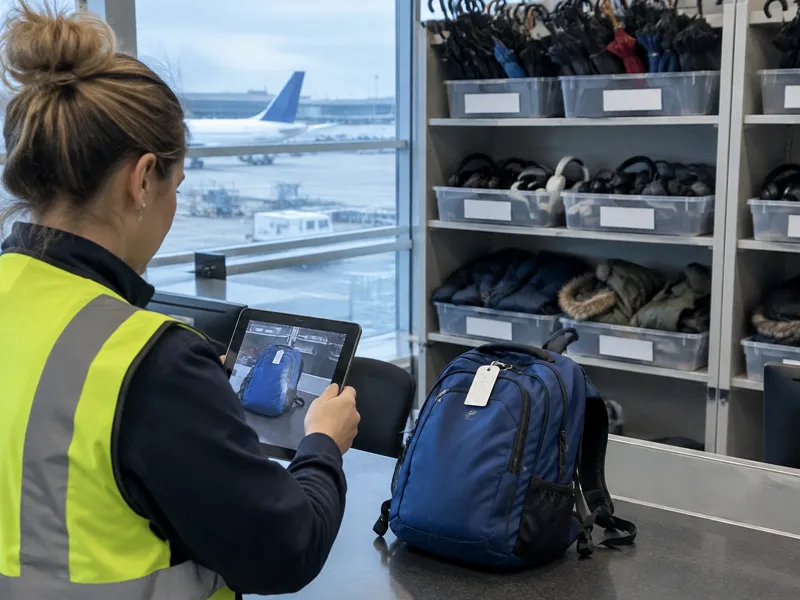
Airports handle large numbers of items left in terminals, at security checkpoints, in lounges and in baggage halls. Staff must record each item, respond to passenger enquiries and keep a clear history of what happens to every item. Paper notebooks and spreadsheets become difficult to search and share once volume grows or multiple shifts and terminals are involved. Dedicated lost and found software replaces those methods with one searchable system.
How does lost property work at an airport?
Terminal items are usually handled by the airport’s lost property service, which is often run by a contractor. At Heathrow Airport, Smarte Carte manages lost property across the terminals and maintains a searchable online database. Items are held for three months and usually appear in the database within 24-48 hours of being handed in. At London Gatwick, the Excess Baggage Company operates the lost property office for items found in the terminals.
Items left on aircraft are handled separately by the airline or its ground handler, not by the airport’s terminal lost property team. Passengers who left something on a plane must contact the airline directly.
At some airports several different organisations handle different areas. At Los Angeles International Airport (LAX), the Airport Police Lost and Found Unit manages items left in public areas such as baggage claim and parking lots, while TSA handles items left at security checkpoints and airlines handle items left on aircraft and at gates. At Chicago O’Hare (ORD), the airport directs passengers to different contacts depending on the location: airlines for ticket counters, gate areas or aircraft; TSA for checkpoints; Chicago Police for public areas of the terminal; and other operators for parking, transit systems and retail.
Because many passengers have already left the airport (or the country) by the time an item is found, airports often need a process for verifying ownership and arranging shipping. For more detail on specific airports, see the existing Find-It guides for Heathrow, Gatwick, LAX and O’Hare.
Why do airports use dedicated lost and found software?
Airports face several operational pressures that paper or spreadsheet methods struggle with. Items arrive from many locations across terminals, and staff on different shifts need access to the same records. Passengers often submit claims after they have already left the airport, so the system must support remote claim submission and clear matching. Retention rules typically require items to be held for a set period (often three months) before they can be donated, sold or disposed of, and each decision needs a documented record.
What this means for you: If your airport still relies on notebooks or spreadsheets, a dedicated system can give every shift a single searchable record and reduce the time spent answering the same passenger questions by phone or email.
What should airports look for in lost and found software?
Airports typically need software that supports these practical requirements:
- Staff can log a found item on the spot (often from a phone or tablet) with a description, location and photo.
- Passengers can submit a claim online through a form or branded page, so they do not have to call or visit in person.
- The system can match claims against found inventory and keep a clear status history.
- Retention periods and disposal decisions can be tracked with a record of what happened to each item.
- Multiple terminals or locations can be managed under one account where needed.
- Access controls allow different staff roles to see or edit only the records relevant to their work.
These capabilities help airports reduce manual searching, improve the passenger experience and maintain the documentation required for high-volume operations.
What this means for you: Prioritise mobile logging, online claim submission and clear status tracking when evaluating options, because these features address the most common daily bottlenecks at airport lost property desks.
How does Find-It for Business support airport operations?
Find-It for Business is a lost and found management platform for businesses. Staff tag found items on the spot from their phone. Customers submit claims through the business’s own branded lost and found page (via link, QR code or embedded form), and claims are logged automatically. Claims, and public lost item listings posted on the Find-It consumer platform, are automatically matched with the business’s found inventory. The platform includes a documented digital claim process with ID and signature verification, plus status tracking.
The Free plan includes up to 5 items and 5 claims per month, 1 location and basic item management. Paid plans add a branded claim page with QR code, staff roles and permissions, more locations, and an embedded intake form on higher plans. See the pricing section for current details.
Frequently asked questions
How long do airports usually keep unclaimed items?
Heathrow holds items for three months. Many other airports follow a similar retention period before items can be donated, sold or disposed of, but always check the specific airport’s policy.
Do airports need different software for terminal items and aircraft items?
Items left in terminals are usually handled by the airport’s lost property team. Items left on aircraft are typically handled by the airline. Confirm the process for your airport.
Can passengers claim items after they have left the airport?
Yes. Many airports allow online claim submission so passengers can report a loss and check status remotely.
What happens to items that remain unclaimed?
After the retention period, airports typically donate, recycle, sell or dispose of items and keep a record of the decision. Local rules and the airport’s own policy determine the exact process.
Is lost and found software only for large airports?
Not only. Any airport where volume, several shifts or several terminals make paper logs hard to manage can benefit.